Keepalived is a routing software and a tool of cluster deployment.It based on the VRRP (Virtual Router Redundancy Protocol). There 2 main functions of keepalived,one is health checking for LVS systems,the other is implementation of the VRRPv2 stack to handle load balancer failover.
1.Computer Cluster
A computer cluster consists of two(or more than 2) hosts to complete one mission.There many kinds of cluster like High Available Cluster,Load Balance cluster and so on.The cluster can be regarded as one system,it controlling and dispatching by software.
2.Virtual IP Addresses(VIP)
2.1.Definition
In the high available cluster,VIP usually provides external service,and you can bind a VIP to multiple servers.The virtual IP address works with Keepalived to build an HA cluster. ECSs in this cluster can be accessed through one virtual IP address.
2.2.How to configure the Virtual IP Address?
In the cloud server platform,you can assign a VIP first.Then,you can bind hosts(instances) to the VIP.EIP means elastic IP address,a cloud server has it’s private IP and EIP.Elastic IP address can be visted by public network.Private IP can be visited by the intranet only.

And then,configure the VIP in the command line.Input ‘nmcli connection show’ to show connections.
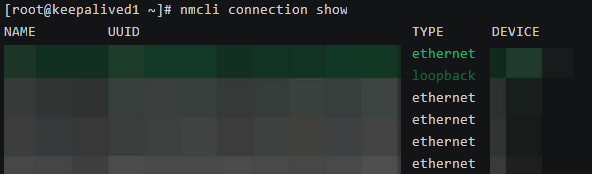
Input ‘nmcli connection modify (Connection) +ipv4.addresses (VIP)’ to add the VIP,and ‘nmcli connection up (Connection)’ to restart the connection.The VIP will be configured.You can input ‘ip addr show’ to check it.
After the configuration,you can input “ip addr” in the command line of host to show VIP.
2.3.VIP in the High Available Cluster Based on Keepalived
There are two hosts in the cluster.One is the master host,the other is backup host.Master host and backup host have been bound VIP.When the keepalived service in two hosts is running,input “ip addr show” in two hosts,you can see VIP in the master host.
When the master host is down,or keepalived service in the master host is down,the VIP will transfer to the backup host.Then,when the keepalived service in the backup host is running,you can input “ip addr show” to show VIP.
You can deploy nginx service to verify it.The first nginx service in the master host,the second nginx service in the backup host.When the first nginx service is down,the second nginx service will occupy it.
3.Keepalived Service
3.1.Function
There are two mainly functions of keepalived service.One is health checking of LVS(Linux Virtual Server,a load balancing software).Keepalived doesn’t perform load balancing itself,it provides the high-availability framework that allows load balancers (like LVS or Nginx) to fail over seamlessly.The other function is to handle the failover of load balancing cluster by VRRPv2.There are some health checking tools in keepalived,it can dynamically and self-adaptionally check the health of the backend servers in the load balancing cluster,and realize high available by VRRP.
3.2.Keepalived Configuration File
Configuration files of keepalived located in the /etc/keepalived directory.This is a example configuration file of keepalived.

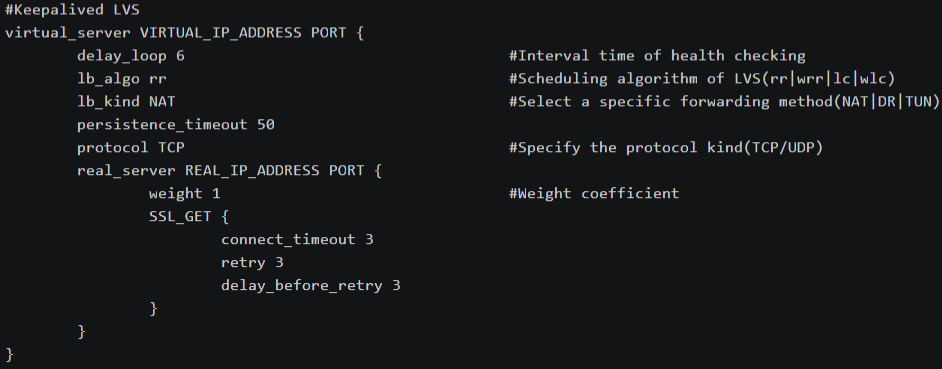
This is the reference manual of keepalived configuration files.
https://www.keepalived.org/doc/configuration_synopsis.html#vrrp-instance-definitions-synopsis
3.3.IP Forwarding
Configuring IP forwarding depends on your architecture.You can input “cat /proc/sys/net/ipv4/ip_forward” in the command line to check it.If the output is 1,the IP forwarding id enabled.If the output is 0,the IP fowarding is disabled.Edit “/etc/sysctl.conf” to set IP forwarding.
When keepalived is sorely for high availability of the service,set “net.ipv4.ip_forward=0” in “/etc/sysctl.conf” to disable IP forwarding.Hosts shouldn’t route traffic for other systems.
When keepalived is used with the LVS(Linux Vitrual Server) load balancer.,set “net.ipv4.ip_forward=1” in “/etc/sysctl.conf” to enable IP forwarding.LVS requires the kernel to forward packets between the client,load balancer,and backend servers.
After setting,input “sysctl -p /etc/sysctl.conf” to apply changing.
3.4.VRRP
VRRP(Virtual Router Redundancy Protocol) is a fundamental brick for router failover.
4.Deployment of Keepalived Cluster
4.1.Preparation
Input ‘dnf install -y nginx keepalived’ to install packages.Input ‘hostnamectl set-hostname keepalived1’ ‘hostnamectl set-hostname keepalived2’ to configurate the hostname.
Edit contents of keepalived.


Then ‘systemctl restart nginx’ to restart nginx service.You visit the page by EIP.

4.2.Configuation File of Keepalived and Kernel Parameter
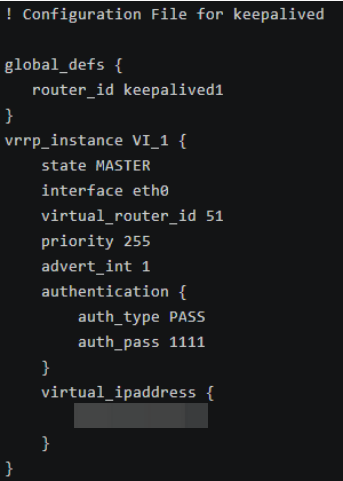
The configuration file of keepalived is /etc/keepalived/keepalived.conf
This is the example configuration file of keepalived1 host.
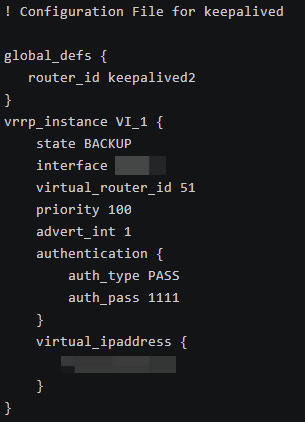
This is the example configuration file of keepalived2 host.
Input “echo ‘net.ipv4.ip_forward =1’ >> /etc/sysctl.conf” and ‘sysctl -p’ to set kernel parameters.Then you can input ‘systemctl start keepalived’ to start the service.
4.3.Verify
In the default situation,you can input ‘ip addr show’ in the keepalived1(master) host,you’ll see VIP in the network device.Input ‘ip addr show’ in the keepalived2(backup) host,you can’t see VIP in the network device.Visit VIP by ‘curl (VIP)’ command,you can see contents of keepalived1’s page.

Then ‘systemctl stop keepalived’ to stop the service in the keepalived1 host.Input ‘ip addr show’ in the keepalived2(backup) host,you can see VIP in the network device.Visit VIP by ‘curl (VIP)’ command,you can see contents of keepalived2’s page.

Stop the keepalived service in the keepalive2,and start keepalived service in the keepalived1,you’ll curl VIP to show contents of keepalived1 host.

Leave a Reply